Room type
AI home office design from your photo
remyhomeai redesigns a photo of your home office. The desk, chair, shelving, lamp, rug and wall colour change to match the style you choose. The window, the door and the camera angle stay fixed, so the desk ends up facing the same way it does today.
That matters for an office because screen glare and the video-call backdrop both depend on where the window is. Pick a style and palette, lock what must stay, and the result takes 30 seconds to 3 minutes before it is saved to your library.
3 designs free each month. No card required.
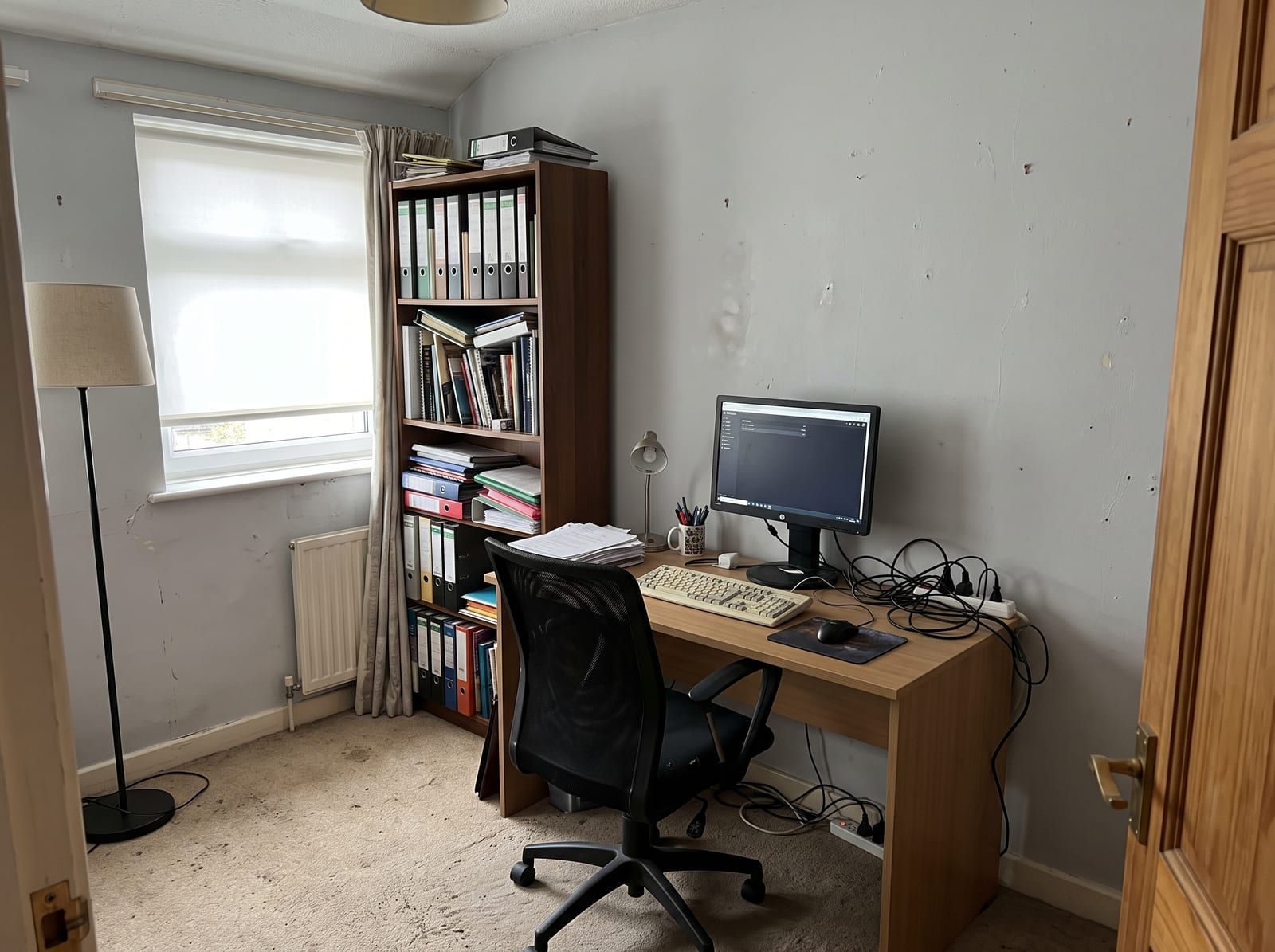
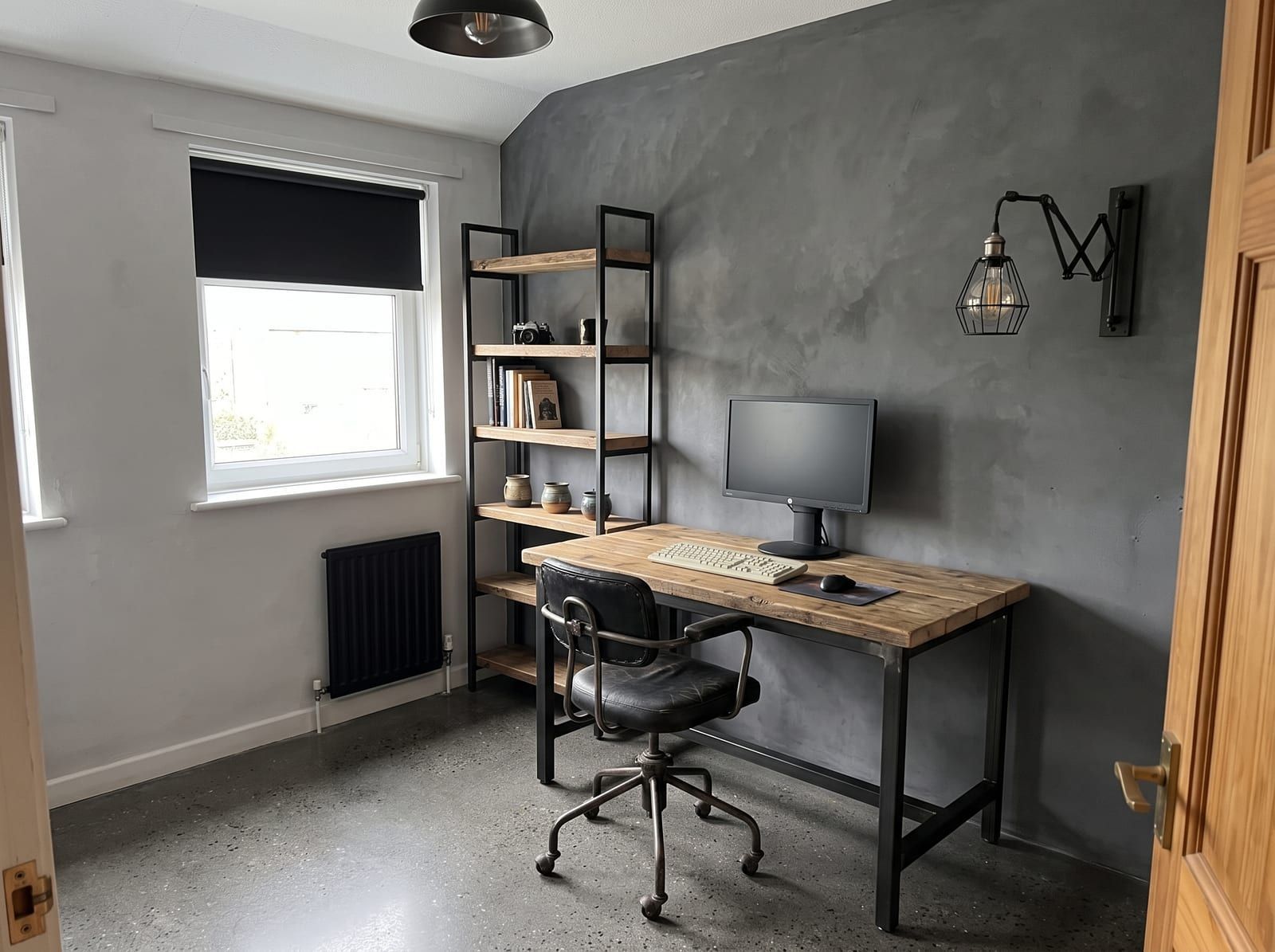
Drag to compare. One home office photo, restyled in Industrial with remyhomeai's AI model.
What changes and what stays
The desk and chair are restyled in place. A folding table becomes a desk that fits the style, and the office chair becomes a chair in the same spirit. The monitor usually stays as a monitor, because the model reads it as a fixed object, but the stand, cables and keyboard get tidied.
Shelving, pinboards and storage change. Open shelves may come back as closed cabinets in a minimalist run, or as metal and wood in an industrial one. Wall colour behind the desk changes unless you lock walls, and that wall is your video-call backdrop.
Soft items appear: a rug, curtains, a fabric panel or a plant. These are what give a render its acoustic softness, and they are also the cheap changes that make a hard, echoing box sound better in real life.
The window stays where it is, and so does the radiator under it. If the window is behind your screen in the photo, it is behind your screen in the render.
Which styles suit a home office
Industrial is the style in this page's before and after pair. A wood and steel desk, black shelving, a task lamp and a leather chair give an office a working look, and the style tolerates cables and equipment better than a softer one does.
Minimalist suits a small office in a spare room or a corner of a bedroom: one desk, one chair, closed storage, nothing on the wall. It also gives the plainest video-call backdrop. Scandinavian is the middle ground, with a pale desk, a wool rug and a shelf of books behind you.
Modern suits a dedicated office with a large window: glass, metal and a statement lamp. Traditional works in a study with a fireplace or panelling, where a wooden desk and a reading chair belong. Eclectic is a risk on camera; a busy backdrop pulls attention from your face.
What to lock before you run it
Lock the windows. Where the daylight comes from decides where the screen can go without glare, and the render should keep that constraint honest.
Lock walls if you are happy with the backdrop colour and only want furniture. Leave walls unlocked if the backdrop is the problem; a plain mid-tone wall behind you reads better on camera than white.
Name the desk if it is a standing desk or a built-in. Name a radiator, a cupboard or the shelving unit that holds your router. Lock the floor if you are in a rented flat with carpet.
How to photograph a home office for a good result
Shoot from where the door is, with the desk, the chair and the wall behind the desk in frame. Then take a second photo from your chair, looking at the wall your camera sees on calls. Upload both together and the two views get the same scheme.
Turn the monitor off. A lit screen becomes a bright rectangle the model treats as a light source, and the result around it goes dark. Unplug or tuck away cables; the model does not invent cable management, it copies what it sees.
Shoot in daylight with the blind open. If the window faces the camera, close the blind halfway so the frame is not blown out. Keep the phone level; a tilted shot leans the shelving in the render.
Problems a redesign can and cannot show you
It can show you a darker wall behind your chair for calls, a desk that matches the floor, closed storage instead of open clutter, and soft surfaces that will cut echo. It gives you a backdrop you can test with your webcam before you buy paint.
It cannot move the window, add a power socket where the new desk sits or tell you whether a desk of that depth fits the alcove. It does not measure. It cannot predict how a room sounds; the rug and curtains in the render help, but the render is a picture, not an acoustic test.
The desk and chair in the image are not products you can click. Use the result to brief yourself, then shop with a tape measure.
Home office questions
Will my monitor and desk stay in the same position?
Yes. The photo fixes where they are. Their style changes; their place does not.
Can it give me a better video-call background?
It restyles the wall behind your chair with colour, shelving or soft panels in the chosen style. Photograph that wall from your seat so the render shows what your camera sees.
Can it fix screen glare?
Not directly. Lock the windows and the render keeps the light where it is. A redesign shows you what the room looks like, not how to orient the screen.
Does it work on a desk in a bedroom corner?
Yes. Choose office as the room type if the desk fills most of the frame. The bed in the corner of the shot gets restyled in the same scheme.
Other rooms
- Living roomUpload a photo of your living room and see it redesigned in a new style. Walls, windows and the camera angle stay. Seating, rug and TV wall change.
- BedroomPhotograph your bedroom and get it back in a new style in minutes. The bed, bedding, bedside tables and lighting change. Walls and windows stay put.
- KitchenUpload one photo of your kitchen and preview new cabinets, worktops, splashback and lighting in the same layout. Plumbing and walls do not move.
- BathroomSee new tiles, a new vanity and new fixtures in a photo of your own bathroom. The bath, toilet and basin stay where the plumbing already is.
- Dining roomPreview a new table, chairs, pendant and rug in a photo of your actual dining room. Wall, window and door positions stay exactly where they are.
- HallwayUpload a photo of your hallway and see new flooring, wall colour, storage and lighting in the same narrow space. Doors and the staircase stay put.